Vocabulary dictionary

Kanji dictionary

Grammar dictionary

Sentence lookup

test
 

Forums - Holiday system - feedback and bugs

Top > renshuu.org > Feature Requests/Improvements > Experimental features

Page: 3 of 3


avatar
マイコー
Level: 339

While I look into this - do either of you also use the schedule freeze feature?

0
22 days ago
avatar
マイコー
Level: 339

Ok, so I've isolated a couple of possible issues, and put in fixes. I've also expanded out the logging to provide a bit more info.

I apologize that I do not have any easy way to do this from this end, but to clear out the reviews (move them to a non-holiday day) that are in the wrong spot, please go to your holiday settings, and change them. Ideally, remove one of the holidays, then save. Go back in, then re-add that holiday. It needs to be the reviews, not the new terms, in order to trigger a rebuild.

0
22 days ago
avatar
マイコー (0622, 19:50)

While I look into this - do either of you also use the schedule freeze feature?

​I do not, or at least haven't since well before trying this feature

0
17 days ago
avatar
オデー
Level: 230
マイコー (0622, 23:09)

Ok, so I've isolated a couple of possible issues, and put in fixes. I've also expanded out the logging to provide a bit more info.

I apologize that I do not have any easy way to do this from this end, but to clear out the reviews (move them to a non-holiday day) that are in the wrong spot, please go to your holiday settings, and change them. Ideally, remove one of the holidays, then save. Go back in, then re-add that holiday. It needs to be the reviews, not the new terms, in order to trigger a rebuild.

​I forgot to do this ☹️ so I'll have to try it and then see how we do next week. I got a bunch of reviews again today

0
16 days ago
avatar
オデー
Level: 230
マイコー (0622, 23:09)

Ok, so I've isolated a couple of possible issues, and put in fixes. I've also expanded out the logging to provide a bit more info.

I apologize that I do not have any easy way to do this from this end, but to clear out the reviews (move them to a non-holiday day) that are in the wrong spot, please go to your holiday settings, and change them. Ideally, remove one of the holidays, then save. Go back in, then re-add that holiday. It needs to be the reviews, not the new terms, in order to trigger a rebuild.

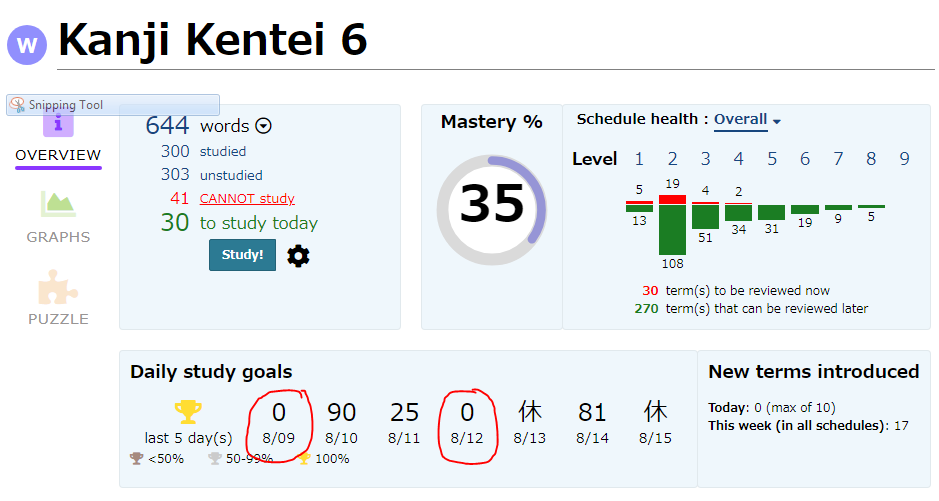
​I did this yesterday afternoon but still got reviews today. Idk if I was too late or if it's still an issue. Here's a few of the terms:

7c8d54e1dc0c8775ebf6ecf6.png2acb0e53d03ddf04830a44d7.jpg


0
10 days ago
avatar
マイコー
Level: 339

Thanks for the report. A few things:

1. These settings have been moved to the Manage your Schedules page, and are no longer present in the Experimental Panel.

2. Can you confirm which day of the week you were referring to when you said "yesterday"?

3. Currently, your holiday is set to Sundays only. However, it appears that you changed it just a day or two ago? Is that true? If so, what did you change it from? (Or is it possible that you were doing the "change, then change back" that I asked you to do?

At the moment (as of writing this), I checked on your account, and a)it is set to Sunday, b)it is currently Sunday evening in your time zone, and c)there are no reviews appearing, just new terms to study. So..I'm a bit confused as to what could have happened "yesterday", as that would have been either Saturday or Friday, and does not appear to be a holiday.

0
9 days ago
avatar
オデー
Level: 230
マイコー (075, 21:56)

Thanks for the report. A few things:

1. These settings have been moved to the Manage your Schedules page, and are no longer present in the Experimental Panel.

2. Can you confirm which day of the week you were referring to when you said "yesterday"?

3. Currently, your holiday is set to Sundays only. However, it appears that you changed it just a day or two ago? Is that true? If so, what did you change it from? (Or is it possible that you were doing the "change, then change back" that I asked you to do?

At the moment (as of writing this), I checked on your account, and a)it is set to Sunday, b)it is currently Sunday evening in your time zone, and c)there are no reviews appearing, just new terms to study. So..I'm a bit confused as to what could have happened "yesterday", as that would have been either Saturday or Friday, and does not appear to be a holiday.

​On Saturday I did the "change then change it back" that you asked. Specifically I unchecked Sunday, saved, then re-checked Sunday and saved. On Sunday I woke up to a bunch of reviews. By Sunday evening I had finished them cause I had some free time.

0
9 days ago
avatar
マイコー
Level: 339

Thanks. Just to be sure, I have adjusted the UI slightly so that when you add a new holiday (it would have been part two of your reset step), it not auto-checks the "do you want to move terms that are already scheduled for the new holiday?", and it also stands out a lot more than it did before.

It is possible that you did not see the checkbox (and that's on me), which would have prevented the reset from having an effect.

That being said, I would do the following

1. Go to the new spot for the feature, and do the uncheck/recheck on Sunday.

2. This Saturday (or actually, anytime after Wednesday should be close enough), tap on the schedule name to go to the summary page. A little ways down, it shows expected reviews a few days in the future. Check out Sunday, and see if it has a non-zero number. If it DOES, then I should be able to jump in and get to it before Sunday rolls around.

0
8 days ago
avatar
Elessar
Level: 275

I set Thursday to No reviews & No new terms, but I checked on Thursday (yesterday) just in case, and the new reviews (and possibly terms?) were there. I didn't study anything. Now that it's Friday, I checked in again, and everything had increased again, as usual.

Fortunately, the rollback feature worked, and I could go back to the numbers I saw on Thursday. So it seems possible to use the rollback as a temporary fix until the holiday feature is working correctly. However, that doesn't help track down the root of the problem.

0
5 days ago
avatar
マイコー
Level: 339

Thanks. If I can refer to the message I posted just before yours, it's one the keys to fixing it - if reviews are already done, for example, then it becomes quite tricky to look "into the past" and recreate the original issue.

So, for example, if today is Friday for you, and you set Saturday as a holiday, try jumping right over and see if Saturday is showing reviews. If so, as long as I can get to it before your Friday, then I have something I can work with :)

0
5 days ago
avatar
Elessar
Level: 275

Tomorrow (Saturday) I'm not planning on doing any studying, so it works perfect. I set Saturday as a holiday, and the schedules are showing , so no reviews.

I'm going to finish up all my reviews for today, so if everything is working, tomorrow should be all zeros. My clock is set to (GMT +9:00) Tokyo, so it will roll over in approximately 9 hours from this post. Then you can take a peek if you'd like.

0
5 days ago
avatar
マイコー
Level: 339

Thanks for the reply. Probably just while you were writing that, I found a logic error thanks to the logs that came off of your account. I *think* I got it fixed.

It will require a "reset" of the holidays. I will do this for everyone, but if you want to jump in now, it's easy: just go to the list of holidays, remove one, save. Then re-add, save.

0
5 days ago
avatar
Elessar
Level: 275

Okay, I removed Saturday, saved. Then I re-added Saturday, saved.

You can check my account tomorrow if you'd like to verify it working.

0
5 days ago
Getting the posts


Page: 3 of 3


Top > renshuu.org > Feature Requests/Improvements > Experimental features


Loading the list
Lv.

Sorry, there was an error on renshuu! If it's OK, please describe what you were doing. This will help us fix the issue.

Characters to show:


Use your mouse or finger to write characters in the box.
■ Katakana ■ Hiragana