I accidentally deleted 'words for Japanese basics' and can't get it back :( I went on 'manage schedules' but can't find it anywhere, does anyone know how I can get it back?
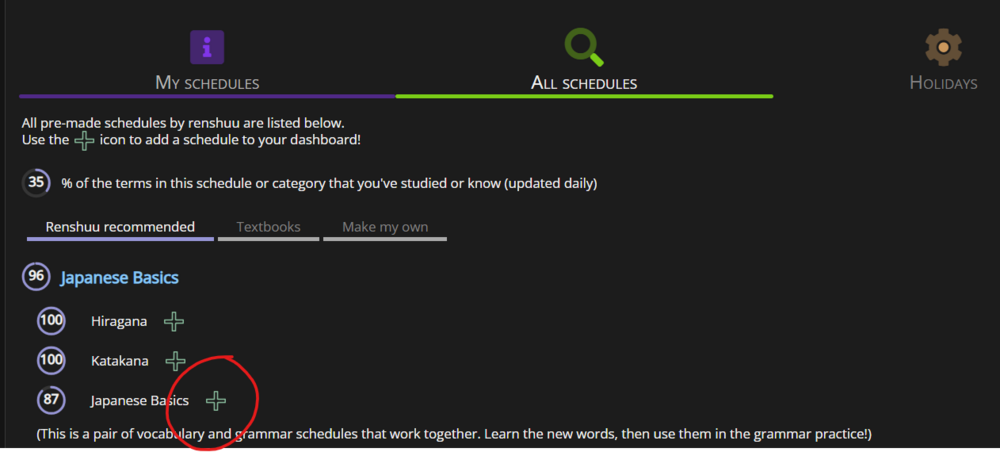
On your Dashboard, below your schedules, tap/click "Manage your schedules" ("Manage your schedules to change what you are studying, freeze schedules, and more!") → "All Schedules" → add "Japanese Basics".
This might add both the words and grammar schedules, so you may need to delete any duplicates. It might be better to delete both first and then add them back. Just to make sure they're linked together.
Edit: Looks like you can't add "Japanese Basics" if any of two schedules are present, so you need to remove "Japanese Basics" (grammar schedule) before adding them back.
You won't lose any progress, don't worry about that :)
(You'll probably need to customise your settings again though. Assuming you changed anything)
On your Dashboard, below your schedules, tap/click "Manage your schedules" ("Manage your schedules to change what you are studying, freeze schedules, and more!") → "All Schedules" → add "Japanese Basics".
This might add both the words and grammar schedules, so you may need to delete any duplicates. It might be better to delete both first and then add them back. Just to make sure they're linked together.